Showing posts with label software tools. Show all posts

Wednesday, October 7, 2009

My Kindle DX and I

I've fielded more questions about my Kindle, and how I use it in Australia, than just about anything else I've mentioned on Twitter so I thought I'd put the information in a blog post.

After October 7 this information is really only useful if you want a Kindle DX - if you're happy with the smaller Kindle then you should buy an internationalised version and avoid all the issues I'll describe.

Why a Kindle?


Books are heavy, and I often want to carry around more than one for reference, especially if I'm doing some writing. At lot of the things I want to read these days are also in PDF and I haven't found a good way to read those - I end up reading a lot either on public transport or just before bed and my laptop isn't convenient in those environments. I tried using my iPhone to read PDFs but that doesn't work for me (other people seem very happy).

The Kindle is great for reading material that's been formatted for the device - I haven't found it to be that good for PDFs (more on that later). It's much better for me than either my laptop or my iPhone. The screen has great contrast, a huge viewing angle, and when I first opened the box I couldn't believe the starting image was being displayed on something electronic.

First Problem


The first problem is that Amazon won't sell you a Kindle DX if your shipping address is outside this USA. My first solution was to have one shipped to a friend in the USA and then shipped on to me, but it turns out that there are people on eBay who can help. My KIndle DX arrived in the original Amazon packaging, with the original seals intact, with a new shipping wrapper pasted over the original.

Charging


The Kindle arrives with a USA style power adapter, but the approach is the same as the iPhone - it's a USB connecter that plugs into the adapter. Since I already have an iPhone charger I can plug into that, or I can charge from my computer.

The Kindle is fairly frugal with power. Since you won't be using WhisperNet you can turn off the wireless connection to reduce battery use. The screen is bi-stable, so it only uses power when you move from one page to another. I charged my Kindle last Friday night - it's currently Thursday morning and I'm still using it happily.

Content


Amazon (who I'll get to later) isn't the only source of content for your Kindle. You can use .mobi files from other sources, or PDFs. For example, I buy combo packs from the Pragmatic Programmers, so I have .mobi versions of all of their books, and their magazine comes out in the same format.

If you want to buy content from Amazon you won't be able to do it with an Australian credit card/address. I've set up a separate Amazon account for my Kindle purchases and given it my old Brooklyn address (you can use that too if you ask me nicely). I buy an Amazon gift voucher on my Australian account and then use the gift card to buy the content on my Amazon Kindle account. It's an extra step, but it's not really that much of a problem. I download the content to my laptop and transfer it to my Kindle via USB (the Kindle looks like any other disk drive).

Carrying an extra device


Yes, it's one more device, but I've put my Kindle in the back pocket of my backpack and I really don't notice the extra weight at all. It's always there if I want to read, and I use it with one hand even if I'm standing on public transport.

Summary


There's no economic reason for me to have a Kindle, but I'm really enjoying the experience. The proof of the Kindle pudding will be how it scales to having the majority of my library on a device I carry around with me. I suspect that this will change the way I treat information.

Monday, September 7, 2009

Code Review for Git

I wanted to find a way to contribute to projects that I couldn't pair on, and to be able to scan a project for possible changes without sitting down and taking up someone's time. Sounded a lot like automated code review, so I had a look around at available code review tools. There are a few available - Review Board, Smart Bear and Crucible among them. I know Atlassian and generally like their products so I decided to install Crucible and give it a try.

There were a few confusing configuration problems. Until I read the documentation more closely (at all?) I wasn't aware that the beta Git plugin only worked against local git repositories, and I had to change a configuration file to convince Crucible that Ruby files should be treated as text instead of binaries, but once I got past these problems I clearly had a powerful tool for distributed, multi-party code reviews available to me.

So I created a review, looked at some code, and saw one thing that I would change. I wrote the comment, but things just felt wrong. It had taken me a while to type to comment (I'm not the world's fastest typist, but nor am I the slowest), and it felt like a waste of time. It would have been far faster to make the change and annotate the corresponding commit, but what I had was a code review tool, not an editor. Something wasn't working for me.

When I do a code review I want to achieve two things - I want to fix the code and I want to educate someone (where that someone may be me, if I wrote the original code). What I really wanted was something (an editor) that would let me focus on changes between versions, but let me change the latest version and save it. My VCS could store the comments against the (small) changes and I could point people to the VCS history to see what I'd done, potentially using the same tool.

After looking at a few different tools last night I've settled on Changes. Changes lets you compare directory structures and files, and it comes with some Ruby scripts that will help you retrieve specific revisions from Git, drop them into temp directories and review the differences. I've modified the script to use the current directory if you're comparing to HEAD, so that changes to the head are saved directly to disk and can be committed.

Here's my process:

1) Use GitX to determine the revision I want to use as the base
2) Use changes to view the differences
3) Incrementally work through the files either making changes or excluding the files.

I've created a (silent) video that shows me working through one review. I only make one small change, so it's mostly scrolling and excluding. One small point - the video uses an older version of my Ruby script that created a temp directory even if you were looking at HEAD, so changes were lost. I've fixed that in this version.

I saw some comments that Changes was rather expensive (US$49.99), but it's really cheap compared to many code review tools so I'm pretty happy with this approach.


Tuesday, July 14, 2009

What would you like in a code quality tool?

Although continuous integration has been a huge step forwards for the development community I think that over time we've tended to treat it as a rather large bucket that we could keep tossing things into. Sure, someone should immediately address that method that's too long, but should it really stop the build and the release of the next version if all the tests pass? My feeling is no, it shouldn't.

I think that the agile community could do more to encourage various parallel continuous processes that test different aspects of the application. In particular, we could separate the static analysis of the code quality from the behavioural analysis that we perform with tests, be they unit, integration or functional tests. If we separate the two aspects then we can look to improve them at different rates and in different dimensions. This separation is the motivation behind an idea that Marty Andrews and Simon Harris have been kicking around for a few years (Marty is the author of Roodi and Complexian, and Simon is the author of Simian, so they have a long-running interest in code quality). Cogent is now planning to turn this into a product - something that you can point towards your source code repository and simply unleash.

We don't have a name for the product yet (suggest one if you like), but it will run static analysis tools (like Checkstyle, Simian, Roodi, Reek, Flay) against each revision of your code base so that you can see trends over time, and it will produce warnings when the values of the metrics exceed certain thresholds. The product will be free for open source projects.

We'll start with a simple, web-based version, probably to run over Ruby projects in public Git repositories (because that's low-hanging fruit for us), but we're going to be very community driven. With this in mind we have a survey that will let you influence the development direction, even before we start. If a tool like this is something that interests you, please fill in our product survey. As a bonus, the first 500 people to complete the survey will get unlimited free access to the product in recognition of their contributions.

Thursday, April 17, 2008

Batch Conversion of Pages file *in Leopard*

I was very proud of my Pages to rtf script, and then I upgraded to Leopard last night and it stopped working! In my search for the answer I came across this post, which solves the problem more thoroughly, though you need to combine it with information from here as well.


In case you don't want to do this yourself, here's a script that will start Pages, prompt you for the type of export you want, and then prompt you for a destination directory, and it works under Leopard. I told you it was more thorough than my last solution :-)


[sourcecode language='jscript']
on open theFiles
tell application "System Events"
if process "Pages" exists then
display dialog "whoops, please close Pages before running droplet!"
end if
end tell
tell application "Pages"
activate
delay 1
close front document
set theList to {"doc", "rtf", "pdf", "txt"}
set theType to (choose from list theList OK button name "Select" with title "Pages Export" with prompt "Choose one or more formats to export using Pages" with multiple selections allowed) as text item
set s to theType as string
set theLocation to choose folder
set theLocation to theLocation as string

repeat with aFile in theFiles
open aFile

if theType contains "doc" then
set asType to "SLDocumentTypeMSWord"
set docName to name of front document

-- Remove .pages extension.
set prevTIDs to AppleScript's text item delimiters
set AppleScript's text item delimiters to ".pages"

-- Add .doc extension.
set docNameNew to first text item of docName & asType
set AppleScript's text item delimiters to prevTIDs

-- Save file to Desktop.
set docPathAndName to theLocation & docNameNew
save front document as asType in docPathAndName

end if
if theType contains "rtf" then
set asType to "SLDocumentTypeRichText"

set docName to name of front document

-- Remove .pages extension.
set prevTIDs to AppleScript's text item delimiters
set AppleScript's text item delimiters to ".pages"

-- Add .doc extension.
set docNameNew to first text item of docName & asType
set AppleScript's text item delimiters to prevTIDs

-- Save file to Desktop.
set docPathAndName to theLocation & docNameNew
save front document as asType in docPathAndName
end if
if theType contains "pdf" then
set asType to "SLDocumentTypePDF"
set docName to name of front document

-- Remove .pages extension.
set prevTIDs to AppleScript's text item delimiters
set AppleScript's text item delimiters to ".pages"

-- Add .doc extension.
set docNameNew to first text item of docName & asType
set AppleScript's text item delimiters to prevTIDs

-- Save file to Desktop.
set docPathAndName to theLocation & docNameNew
set s to save front document as asType in docPathAndName

end if
if theType contains "txt" then
set asType to "SLDocumentTypePlainText"

set docName to name of front document

-- Remove .pages extension.
set prevTIDs to AppleScript's text item delimiters
set AppleScript's text item delimiters to ".pages"

-- Add .doc extension.
set docNameNew to first text item of docName & asType
set AppleScript's text item delimiters to prevTIDs

-- Save file to User Specified Location
set docPathAndName to theLocation & docNameNew
save front document as asType in docPathAndName
end if
try
close front document saving no
end try
end repeat
quit
end tell
end open
[/sourcecode]

Wednesday, April 16, 2008

Batch conversion of Pages files

My current assignment makes me a Mac weenie in a Microsoft world, so while I'm happily tootling along in Pages I need to be able to share stuff with my colleagues. At the moment I'm the primary author of 30+ short course descriptions, stored in separate Pages files, and I've been exporting them to RTF when I need to share them. That was initially ok, but got out of hand as the number of files grew, so yesterday I was introduced to AppleScript.


I know nothing about AppleScript, but I was able to find a script on the web (thanks again, Google) that did most of what I want. I'll show you the script, then tell you the parts that weren't obvious to me and slowed me down


[sourcecode language='jscript']
on open theFiles
tell application "Pages"
repeat with aFile in theFiles
open aFile
set docName to name of front document
-- Remove .pages extension.
set prevTIDs to AppleScript's text item delimiters
set AppleScript's text item delimiters to ".pages"
-- Add .pdf extension.
set docName to first text item of docName & ".rtf"
set AppleScript's text item delimiters to prevTIDs
-- Save file to Desktop.
set docPathAndName to (path to desktop as string) & "rtfs:" & docName
save front document as ".rtf" in docPathAndName
close front document
end repeat
end tell
end open
[/sourcecode]


My first challenge was that I couldn't figure out how to get this to run! Pressing "Run" in ScriptEditor did nothing. I ended up saving it as an applet (use "Save As", selecting FileFormat => application), and then I could drag and drop the files I wanted to convert onto the applet. Once I put the applet in the dock, that was pretty convenient.


The second thing that slowed me down was figuring out how to save the results to a folder (the original script saved to the desktop). What I needed was the bit ' & "rtfs:"' while setting the docPathAndName. Here I'm dealing with a string, and it already has a trailing ":" - I kept trying to add another one, and AppleScript gave me a message about the target not being writable, rather than not existing, which lead me astray for a while.


Anyway, now I can select my Pages files, drag and drop them onto the applet in my dock, and the rtf files appear in a folder on my desktop. Sweet!

Wednesday, January 30, 2008

Uses of OpenID

I'm a user of OpenID, but this video from Google is an excellent introduction to the concept, the uses, and the pros and cons.

Particularly interesting to me as a developer were the ideas of using OpenID as a 'lightweight' authentication mechanism for sites that want a low barrier for registration and access, and recognizing multiple openids so that a site can access id-specific features from each. Highly recommended!

Wednesday, January 23, 2008

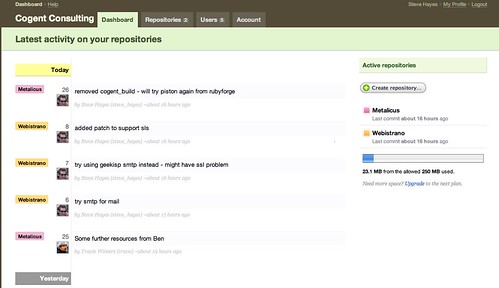
Beanstalk Dashboard

Since I've failed to get the beanstalk dashboard to display in my comments, here's the "team leader" view that Mark was asking about in the last post:

Cogent Consulting Pty Ltd_ Dashboard — Beanstalk-1

Tuesday, January 22, 2008

Excellent support from Beanstalk

We've started evaluating Beanstalk for our subversion repositories, and I had a problem this morning trying to commit to my second repository (the detail is that I was getting the message "Can't create directory '/var/lib/subversion/beanstalk.storage/1911/webistrano/db/transactions/1-1.txn': Permission denied"). Apparently this is a recurring problem on some accounts - probably a teething problem with the service.


Of course I'd rather not have any problems at all, but when I got this message I logged into the Beanstalk Campfire conversation, and within 10 minutes (9 of which were me getting a drink while Chris worked) Chris Nagele has fixed my problem and I was up and running again. Great stuff!

Monday, January 7, 2008

Installing Postgres on Leopard

Excellent article on installing Postgres from binaries on Leopard. Just make sure you have XCode installed first.

Thursday, November 29, 2007

Installing Git on my Mac

Inspired by Dr Nic's post I wanted to install git on my Intel-based Mac. Why? There were two motivations - I frequently do work on the train or tram, and less often on planes, which is the reason Nic describes, but I also wanted to be able to commit mini-milestones on my local machine that I'm not really ready to commit to the "point of truth" on svn. This is the point where I reveal that I don't do all of my programming test first, but that's a longer thread. Suffice it to say that there are periods where I need to work to get the test coverage back over the threshold (currently set to 99.2%) and I don't want to commit to svn until the test coverage is back there.

I installed git-core from MacPorts, but when I ran git-svn I didn't have a "clone" command, which is what all the cool kids are talking about. I'm still not sure that I know precisely why that was the case, but in poking around on the web I found a few places with installation instructions, and eventually things were working, so I'll add what I did to the pool (my main motivation is letting you know the problem I was trying to fix though).

  1. Followed the instructions from http://www.beyondthetype.com/2007/6/15/guide-to-installing-git-on-a-intel-based-mac to install the latest version of Git from source

  2. Re-installed subversion using the package from http://downloads.open.collab.net/binaries.html. Why? Because the last step in the previous instructions (setting the PERL5LIB) didn't help, and I couldn't find the svn-perl libraries anywhere. The instructions on http://speirs.org/2007/07/22/getting-git-svn-working-on-the-mac/ were helpful. After the subversion installation I had a directory /usr/local/lib/svn-perl, which did the job.

  3. Added export PERL5LIB='/usr/local/lib/svn-perl' to my .profile

  4. Added /usr/local/git-1.5.2.1 to PATH in my ,profile (early on, to make sure git was found here first)

  5. When I tried git-svn I got an error concerning Term::ReadKey when perl tried to prompt me for a password. I tried to install Term::ReadKey from CPAN interactively (sudo perl -MCPAN -e 'shell'
    , then 'install Term::ReadKey', but got "Can't exec "./make": No such file or directory at /System/Library/Perl/5.8.6/CPAN.pm line 4566.". The answer was to change directory to ~/.cpan/build/TermReadKey-2.30 and execute the following commands: sudo perl MakeFile.pl; sudo make; sudo make test; sudo make install. Now I have the Term::ReadKey module installed!

  6. When I tried to 'gitify' after that, I got this message : "error: More than one value for the key svn-remote.svn.fetch: :refs/remotes/git-svn". This seems to have been caused by previous failed attempts - removing the xxx.git file and running 'gitify' again seemed to work.


For people like me who are less than clear about the result, here's what you get:

  1. A copy of your project in '../project_name.git'. This is your git working directory.

  2. Your repository is in .git in the git working directory.

  3. Change into the git working directory and start doing your stuff

  4. You'll probably find these commands useful:

    • git status : tells you what's uncommitted

    • git add : adds a new file to version control. "git add *" seems to do everything you'd want :-)

    • git checkout -f : reverts local changes

    • git commit -a : commits any modifications (but not new files) to the repository

    • git-svn rebase : merge svn changes into your git repository

    • git-svn dcommit : commits all your changes back to svn


And if I'd known it was going to be this hard when I started, I wouldn't have.

Tuesday, May 8, 2007

RailsBrain

If you need to refer to the Rails API documentation frequently, as I do, then you'll really appreciate RailsBrain.

Thursday, March 15, 2007

Quicksilver

My Quicksilver education continues. I watched the Merlin Show on using menu items from within Quicksilver (episode 8), and thought it was a great idea (especially for Textmate, which I'm also trying to learn). But when I tried out the example in my QS, it didn't work; at least not at first. So here are the prerequisites for getting menu items to work:

  1. Activate "Enable Advanced Features" in Preferences -> Application

  2. Activate the "User Interface Access (+)" plugin

  3. Make sure that "Enable access for assistive devices" is selected in OS X System Preferences -> Universal Access. I don't have this enabled by default because I use iKey during training courses and it only works if access for assistive devices is turned off.


Hopefully that's it! But if not, Howard Melman has written an excellent Quicksilver User's Guide.

Thursday, March 8, 2007

Upgrading to Webgen 0.4

I use Webgen to build my website, and I've just finished upgrading to the latest Webgen release, 0.4.2, from version 0.3.8, which was over a year old. It was a bit of a pain, and the Webgen documentation is a little lacking, so I thought I'd share my experiences.

First, I could see that I needed to change the format of my block declarations in my content pages from


blocks:
- {name: content, format: textile}
- {name: sidebar_heading, format: textile}
- {name: sidebar, format: textile}


to

blocks: [[content, textile], [sidebar_heading, textile], [sidebar, textile]]


Not a big deal, though I needed to do it in every file (I need to find a way to get rid of this duplication). I thought that would be enough to get me running, but to my surprise every page generated the message "Invalid structure of meta information".

The problem was that my files (originally created in Windows and now living on my Mac) had lines ending in \r\n and Webgen didn't like this. Things worked better when I changed each file to have lines ending simply in \n.

Next I had to replace references to block content in templates from from
{block_name:}

to
{block: block_name}

After that I was 90% of the way there, with all the standard stuff covered. The next step was to handle two places where I'd used included content.

Webgen 0.4 changes the order of the steps in the evaluation of page files. The new order is:

  1. convert to HTML;

  2. then ERB;

  3. then webgen tags.


In earlier versions I believe the steps were performed in the reverse order. This change in ordering broke some of my "custom" code, where I was including common Textile content into a number of pages by reading it from a file via ERB. Since ERB is now run after the conversion to HTML from Textile I was getting the included Textile content rendered as HTML without translation.

One thing I was using this for was to include a common sidebar. However Webgen now supports nested templates, and that's a better way to solve the common sidebar problem. I now have a template that looks like this:


---
template: ../default.template
--- content
{block: content}
--- sidebar_heading, textile
Services
--- sidebar, textile
<div class="training">
* <a href="{relocatable: eat.page}">Easy Access Training</a>
* <a href="{relocatable: index.page}#softwareDevelopment">Software Development</a>
* <a href="{relocatable: index.page}#coachingAndMentoring">Coaching and Mentoring</a>
* <a href="{relocatable: index.page}#training">In-house Training</a>
</div>
For enquiries regarding any of our services, please <a href="mailto:info@cogentconsulting.com.au">email us</a>.


Pages that want the common sidebar use this template and only need to provide the body content.

The other thing I was using an ERB include for was to provide a common set of textile link aliases (things like [three_rivers_essay]http://www.threeriversinstitute.org/steve%20hayes%20essay.htm). These need to be in the same file as the textile source at the time it's converted to HTML which is before either ERB or tags are handled, so it looked like I was out of luck. My solution was to write my own tag, called "site", which provides the same sort of functionality. A reference to the tag looks like {site: three_rivers_essay} or {site: {name: three_rivers_essay, text: "a different piece of text"}} - I'll include the plugin code at the end of the post.

It's good to see Webgen in active development, I like nested templates, and it's quite easy to write plugins. It would be good to see better documentation (hopefully that will come from the new activity as well) but Thomas Leitner provides excellent support via the forums.


class SiteTag ["Suncorp-Metway", "http://www.suncorp.com.au"],
"three_rivers_essay" => ["software tyranny", 'http://www.threeriversinstitute.org/steve%20hayes%20essay.htm']
# and so on
}
infos( :name => 'Custom/Site',
:summary => 'Return standard sites and labels')
register_tag 'site'
param('name', nil, 'The name of the site that will be linked to')
set_mandatory('name', true)
param('text', nil, 'The text that will be displayed for the link')
def process_tag(tag, chain)
return self.link
end
def link
name = param('name')
definition = @@definitions[name]
raise('Could not find site named ' + name + ' in ' + @@definitions.to_s) unless definition
url = definition[1]
text = param('text') || definition[0]
return "<a href='#{url}'>#{text}</a>"
end
end

Wednesday, March 7, 2007

Maven doesn't work for me

I sometimes joke that I don't know anything at all, I just know people who do know things and ask them what to do. The joke is that this is partly true - in software development it's impossible to know everything, so it's important to rely on people you trust. Which brings me to Maven 2.

I've had a number of people that I respect recommend that I start using Maven 2, so I thought that I would try it on a project that's just starting out. On the other hand, I heard from people on related projects that they'd tried it without success. No problem, I thought, I've got access to some people who have used it, who have a fairly good idea of what I'm after in a build, and I'll be able to get some guidance from them. Given that I had conflicting advice and I was the one advocating Maven, I decided I should do the implementation myself rather than delegating the potential pain to someone else, and that's what I did.

I've spent a day and a half on this and got something that's working ok, but when I get to work today I'm going to back it all out and go back to the Ant-based approach that other teams are using. Why? Because although Maven 2 may work, I can't make it work the way I want it to (the "I" in that sentence is quite important).

First, I love the Maven 2 dependency mechanism. It's great, and even though Maven doesn't rock my world the experience has encouraged me to go and look at Ivy (though that's in the future). My problem is that Maven 2 wants me to conform to its view of the world, and that doesn't match what I want to do. That would be fine if there were plenty of hooks to let me do it my way, even if that was expensive, but either these hooks are missing or the documentation on how to use them is nonexistent or inaccessible (and it's probably a mix of all of these).

So what do I want my build to do that's "non Maven"?

  1. I want to run separate unit and integration tests in one project, and have reports (test results and coverage) for both of them, and I only want to run the tests once to get it. There is a note in the documentation that says that Cobertura will force the tests to run twice and that this will be fixed in future, but every configuration I tried ended up running the tests even more than this.

  2. I want to be able to package the code with instrumentation, run integration tests using this code in a WAR, and measure the coverage.

  3. I want Checkstyle (and Simian and Complexian) to run over all my code, including the tests


I tried separating the integration tests into a separate module and deploying a jar from the "core" module to the integration module, but that didn't give me coverage of the integration tests because the code in the jar wasn't instrumented. The alternative seems to be to compile the code again so I can run the integration tests over it - this seems like a great big hack, and seems to predict more great big hacks down the way.

The idea behind Maven 2 is great, and if you're happy with the outcomes that's great, but the current implementation and documentation doesn't provide the level of customisation I'm looking for.

If anyone has a POM that handles the three points that I would like in my build, than I would be more than pleased to receive it and blog about my experiences using it. I want Maven 2 to work for me, and it's disappointing that it doesn't.